
T2QCAL
the calculator
that quotes.
Ninety-five construction calculators, each drawing the job as you type it, and a Measure tab that turns the phone's camera into a level, a clinometer and a photo tape. It signs in with your Tradies2Quote account, so a quantity worked out standing in the trench goes onto your quote list before you've got back to the ute.
The manuals you'd otherwise be googling — GIB, MiTek, James Hardie, Pryda, Concrete NZ — sit on the phone and read with no signal.
Open T2QCAL web app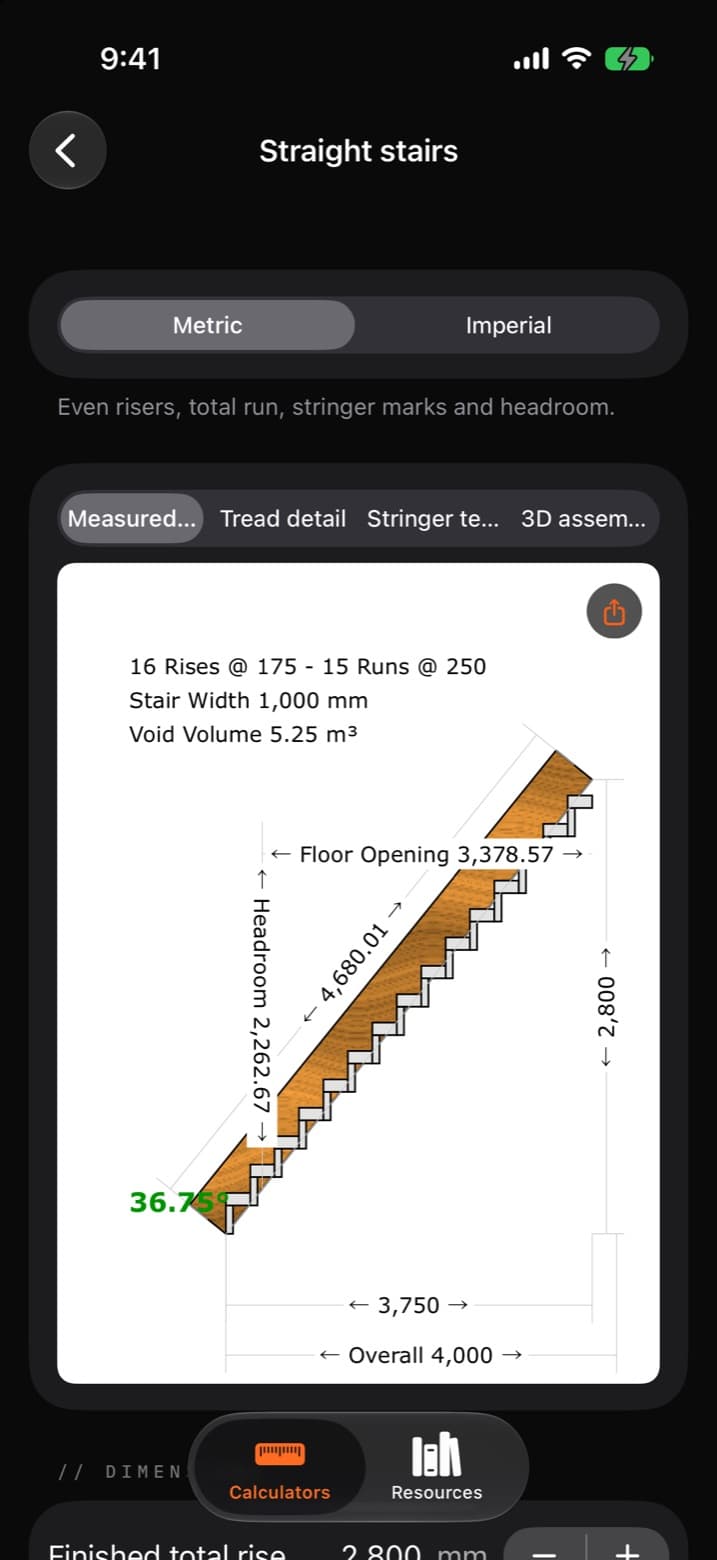
Same login.
Same rates.
There is no second sign-up. T2QCAL authenticates against the same server Tradies2Quote does, so your email and password work in both — and your labour rate, markup, GST rate and currency are read from the same profile the website prices from. Change your markup in settings and the calculator quotes at the new one next time you open it. The two cannot drift apart, because there is only one copy.
Sign in once
Your Tradies2Quote email and password. No separate account, no extra subscription.
Your own numbers
Markup, GST rate, tax label and currency come off your profile — not a default someone else picked.
Signed out still works
Every calculator and the whole manual shelf run without an account. Signing in is only for sending a quote.
Measured.
Not guessed.
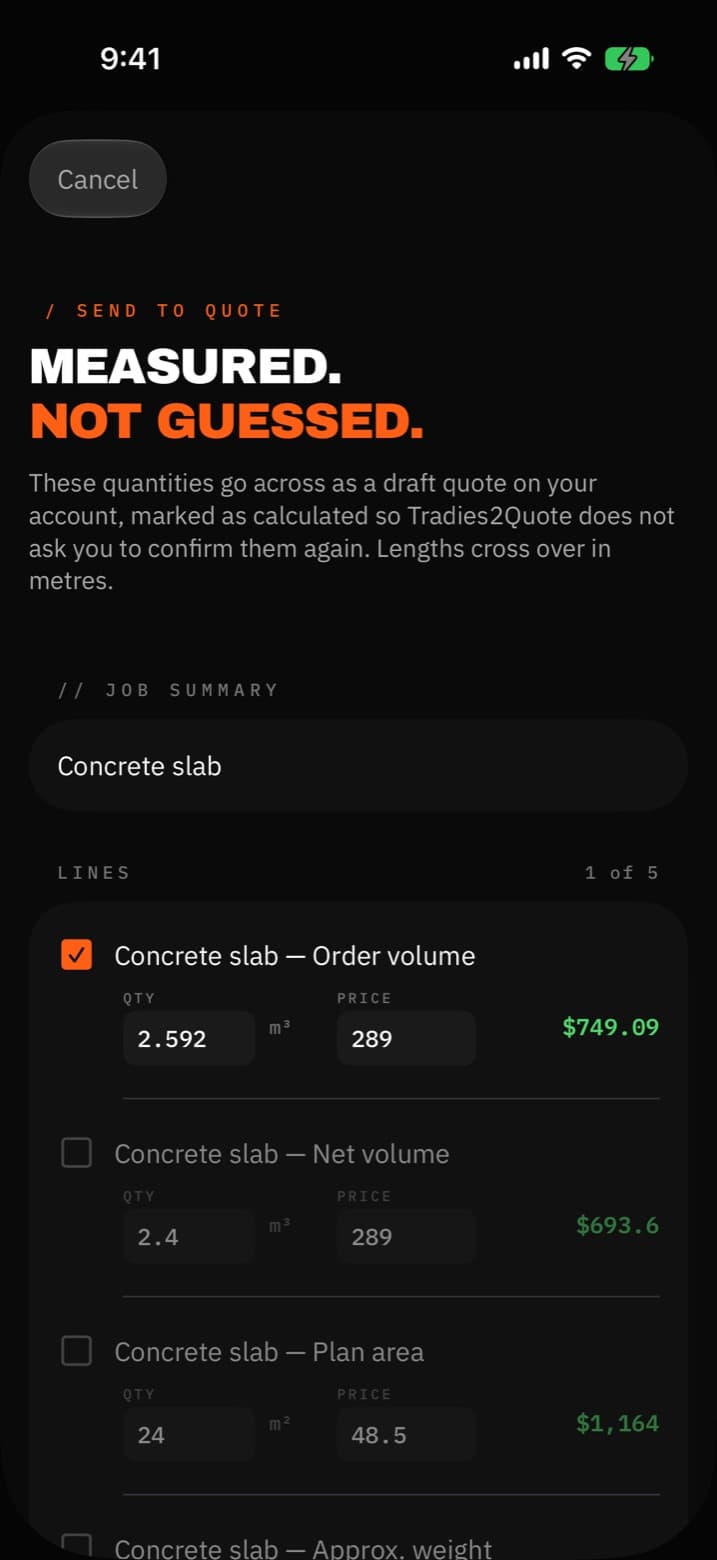
Work out the slab, tap Send to a quote, and the order quantity goes across as a draft on your quote list — described, measured and priced at your markup and your GST. Open it in Tradies2Quote to add labour, pick the client and send it.
Nothing goes across unseen
The quantity and the working behind it are shown before you send, and every figure stays editable in the draft. You approve it, not a black box. The iPhone app goes further and lists each quantity with a tick.
It won't count the same concrete twice
On a slab it sends the order volume — the pour with its waste allowance — not the net volume as well. Where there are two ways to buy the same thing, like concrete to order or bagged concrete for post holes, only one goes across.
It won't re-ask what you just measured
The lines are marked as calculated, which is the flag Tradies2Quote uses to tell a measured quantity from an AI-guessed one. It doesn't make you confirm them again.
95 calculators.
Every one draws.
Not a list of formulas — each tool draws the thing you're building as you type: a measured sheet with the dimensions on it, a set-out detail, and a 3D assembly of the actual job. A rafter calculator draws the birdsmouth. A stair calculator draws the stringer.
- Materials & quantities14
- Concrete & masonry12
- Roof & rafters11
- Centers & spacing10
- Convert & measure10
- Decks & fencing8
- Metal & tubing8
- Printable templates8
- General geometry8
- Stairs & balustrades6
Metric and imperial throughout · quantities cross into a quote draft with the working attached
76 manuals.
No signal needed.
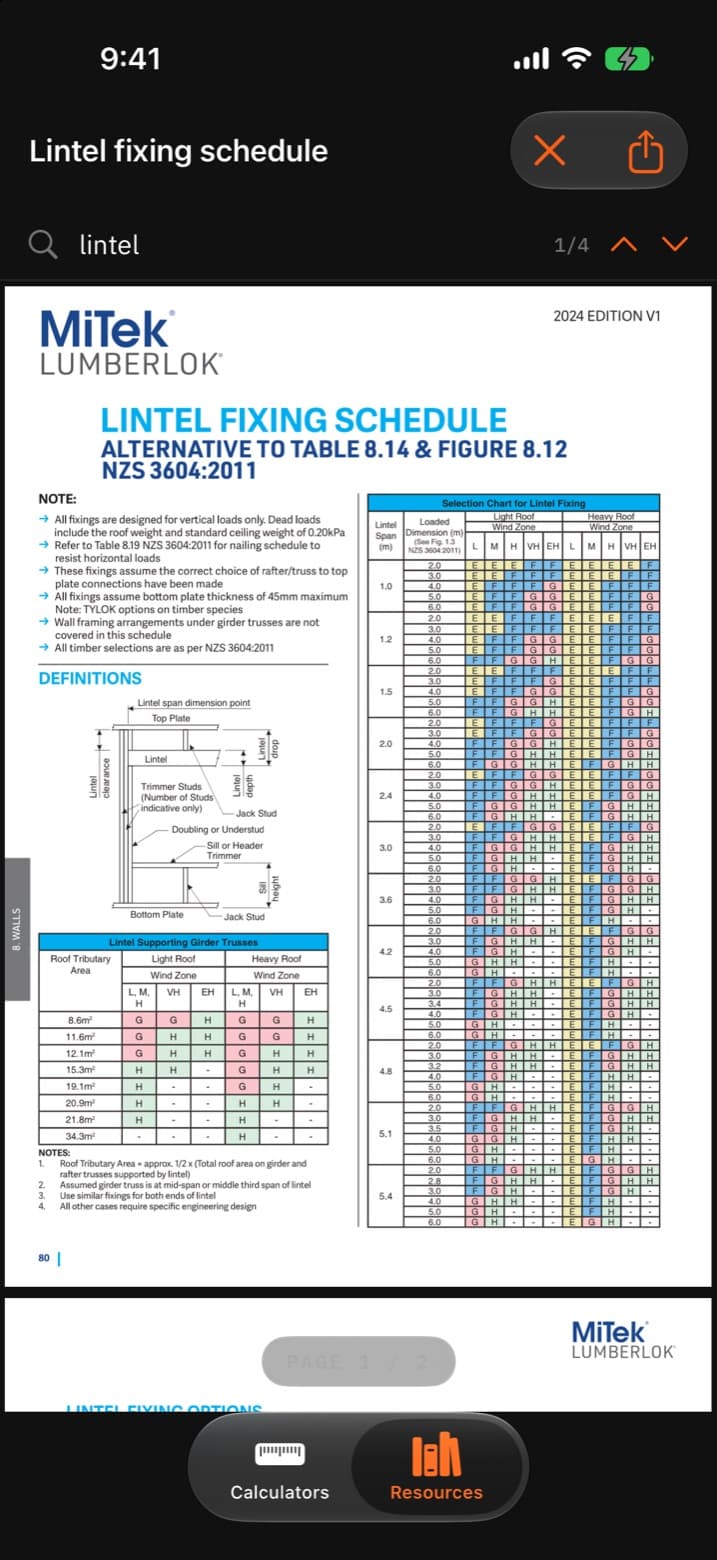
Span tables, fixing schedules, bracing ratings, wet-area details — pulled down once over wifi and readable in a subfloor, a stairwell or a valley with no reception. Searchable, with the page count and match counter right there. The Building Code clauses are on the shelf too, linked rather than stored, because MBIE will not serve the files to an app.
- MiTek NZ ×25
- James Hardie NZ ×14
- MBIE Building Performance ×10
- Winstone Wallboards (GIB) ×6
- Pryda NZ ×5
- CHH Woodproducts ×3
- Concrete NZ ×3
- WorkSafe NZ ×3
- Firth ×2
- Resene ×1
- MBIE Building CodeHub ×1
- MBIE, Standards NZ & BRANZ ×1
- NZ Metal Roofing Manufacturers ×1
- Standards New Zealand ×1
61 download directly
The other 15 are web pages — mostly Building Code clauses MBIE publishes online only — so the app opens the publisher's page instead of saving a copy.
Always the current issue
Nothing is bundled into the app. Pull a manual again and you get whatever the publisher is issuing today.
Point the phone.
Read the number.
The Measure tab turns the phone's camera and tilt sensors into site tools. Nothing is uploaded — it all runs on the phone, and it works offline once opened.
Level & pitch
Sight along a roof line for its pitch, or lay the phone on a member for tilt, grade and 1:n fall. Sends the angle straight to the rafter calculator.
Height & distance
Aim at the base, then the top: the distance to a wall or pole and its height, from where you stand.
Measure a photo
Tap something of known size in the shot — a 90 mm stud, an A4 sheet — then read any other span in the same plane.
A check, not a survey · take the tape for the cut
The number,
and the clause behind it.
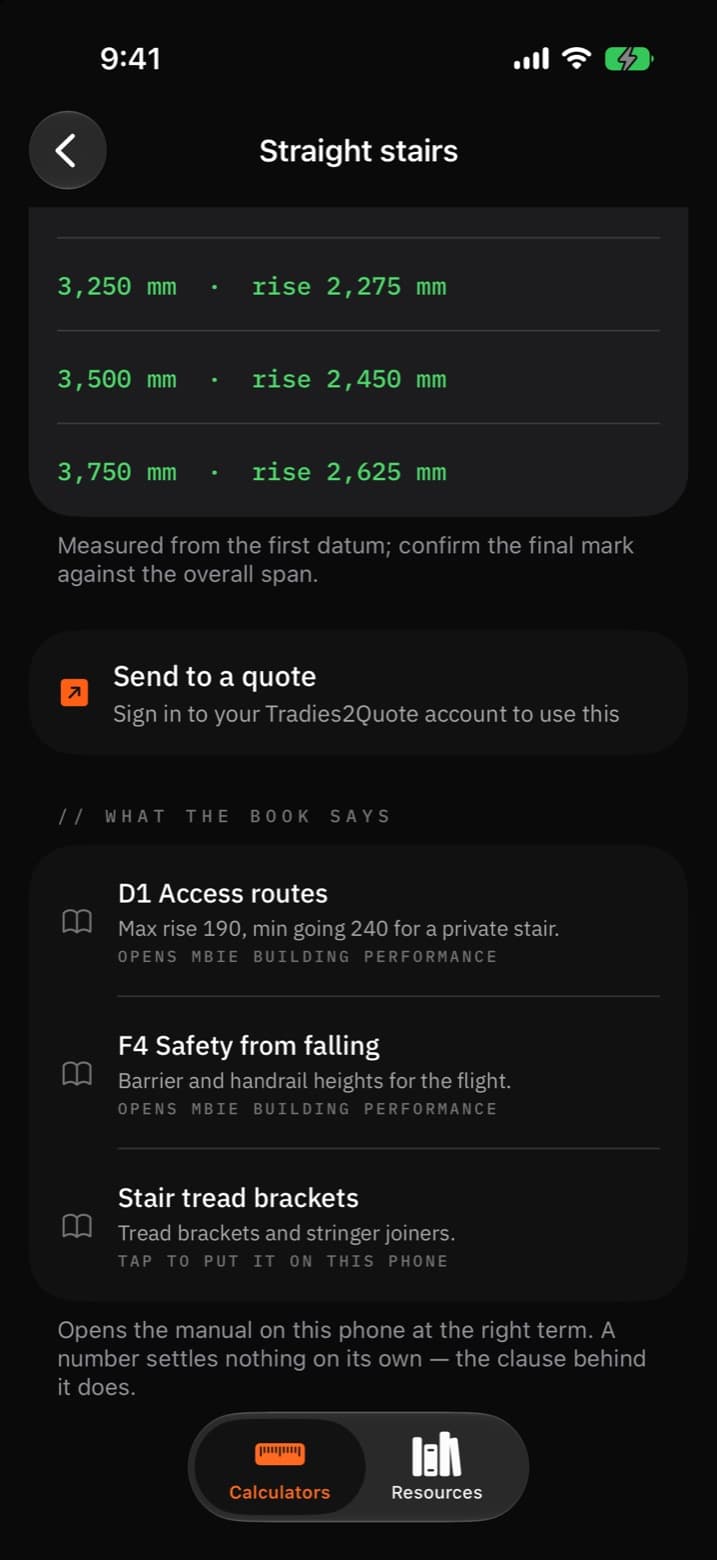
Every calculator carries the standards and manuals that govern it — NZS 3604 and B1 first, then the clause and the manufacturer sheet for that job — and it opens the manual at the right search term — not the front cover, and not a search box on a website.
Set out joists and the GIB Site Guide opens at “fixing centres”; pour a slab and the CCANZ guide opens at “slab”. Work out a flight of stairs and MiTek's stair tread bracket sheet opens at “tread”, with D1 Access routes and F4 Safety from falling listed beside it — those two go to MBIE's own page, because the Building Code site blocks downloads and the app says so rather than saving you an error page.
The eighteen calculators that carry nothing are the ten converters and the eight printable templates. No clause governs a millimetres-to-inches conversion, and padding it with a plausible-looking reference would be worse than saying nothing.
Every one of those references is checked automatically against the library, so a link can't rot into a dead end.
Built and working.
Not on the App Store yet.
Use the T2QCAL web app now and add it to your Home Screen. The native iPhone app, including its offline manual shelf and device features, is awaiting App Store distribution. Leave your email for a message when the native app becomes available.
- What does it cost?
- Nothing on top of Tradies2Quote. It's part of the same account, not a second subscription.
- Do I need an account to use the calculators?
- No. Every calculator and the whole manual shelf work signed out. The account is only what ties a quantity to your quote list.
- Android?
- Yes. Open the T2QCAL web app on Android, iPhone, tablet or desktop. You can add it to your Home Screen separately from Tradies2Quote. The native iPhone companion is still awaiting App Store distribution.
- Does it store the manuals?
- It fetches each one from the publisher's own address onto your phone and keeps it for offline reading. They stay the publisher's files, and pulling one again gets whatever they're currently issuing — which for a span table is the difference that matters.
Already quoting with us? Open Tradies2Quote · Back to the site